

How configuration changes work
Every change to item types, relationships, lifecycles, roles, permission cells and page layouts is staged into a change request, reviewed there, and applied only when you promote it; configuration is never edited live. Promotion produces a numbered configuration version carrying the whole configuration as a snapshot: a named, hashed, verifiable record of every state your project has run under.
The change request
Section titled “The change request”A change request is a fork of the project’s current configuration version, opened under Change requests in the project’s configuration settings with a name, an optional description and an expiry in days. The Items, Relationships, Lifecycles, Roles, Permissions and Layouts editors then stage into it.
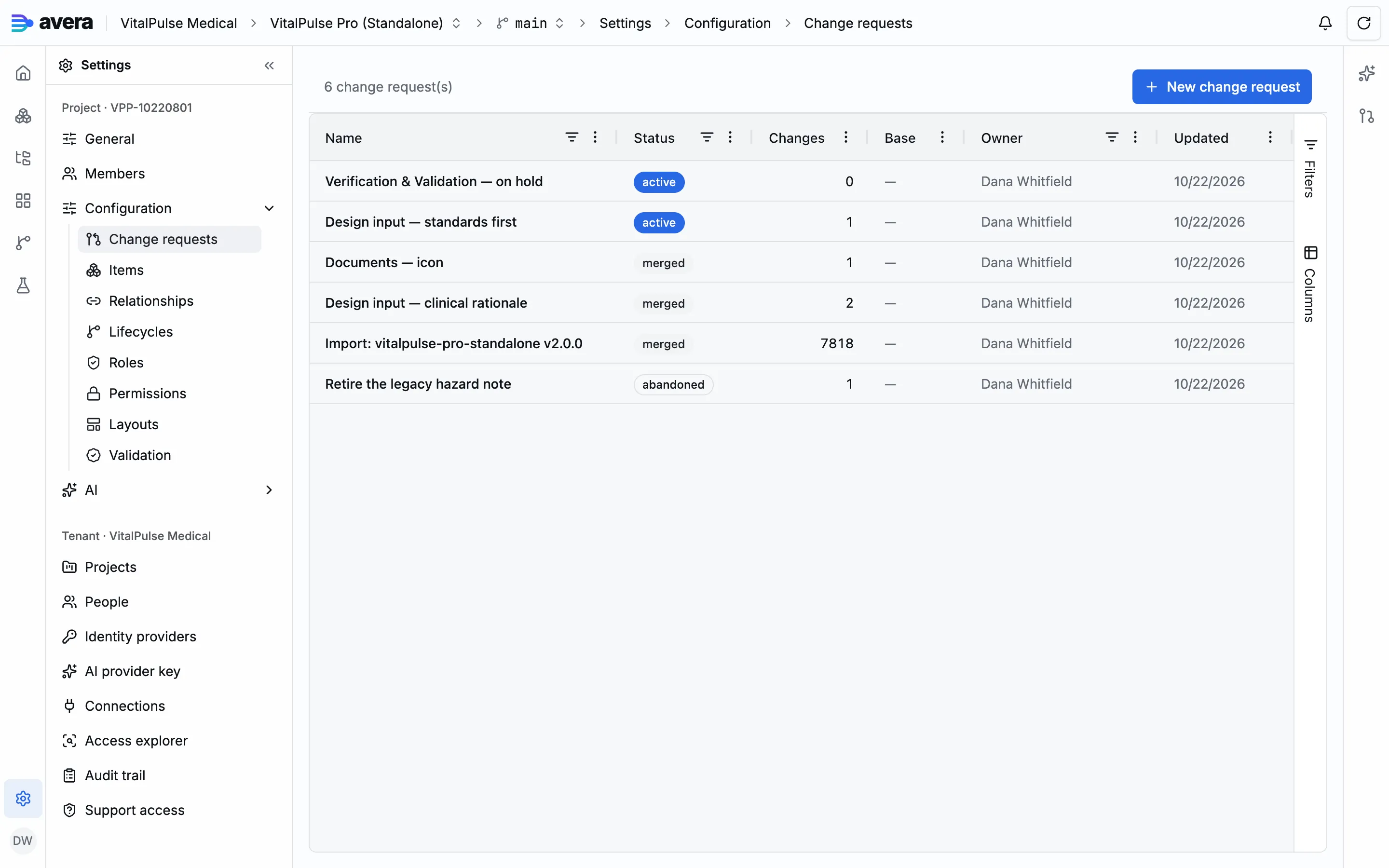
Several change requests can be open at once, each recording the base version it forked from, which review reports as out of date once the live configuration moves on.
Opening, staging into and promoting a change request require project administrator rights. See People and access.
Typed changes, not free-form edits
Section titled “Typed changes, not free-form edits”Each staged change is one typed action against one named target. The review grid groups them by editor:
| Group | What a change names |
|---|---|
| Items | an item type, an item type category, an attribute definition including its formula expression, or the assignment of an attribute to an item type |
| Relationships | a relationship type with its allowed pairs |
| Lifecycles | a lifecycle, one of its states, or one of its transitions |
| Roles | a role definition |
| Permissions | a permission rule |
| Layouts | a page layout |
Every staged change carries its before and after state, a summary, a risk level and whether it is breaking or needs data migration. A change you no longer want is reverted out, and editing something created in the same change request amends that create rather than stacking a second on it. For what each dimension holds, see The meta-model, Lifecycles and Page layouts.
A proposal always waits for a human
Section titled “A proposal always waits for a human”A change is authored by you in the editors, by the in-product chat, or by an external agent through the MCP connector. The last two never write: they produce pending proposals, cards in the Changes panel for a project administrator to accept or dismiss.
Accepting stages the change without applying it, per action, so you can take part of a batch. When an accepted action names a slug another still-pending action in the batch creates, the server accepts that producer too, transitively, and says what came along.
A proposal naming a target that does not exist, or creating something already live or already staged, is refused when proposed rather than at promotion.
The impact preview is a dry run
Section titled “The impact preview is a dry run”Before you accept a proposal you are shown its impact: the batch is staged into its real change request, analyzed by the same machinery promotion re-runs, then rolled back. Accept stays unavailable until the preview has loaded, and an action whose preview carries a blocker cannot be accepted.
Reviewing what is staged
Section titled “Reviewing what is staged”The change request page lists every staged change grouped by configuration dimension, with its risk, blast radius per branch and findings verification raised. Opening one shows which items it would affect. Findings belonging to no single change, such as cross-configuration inconsistency or an out-of-date base, are listed on their own, and you can re-run the checks at any point.
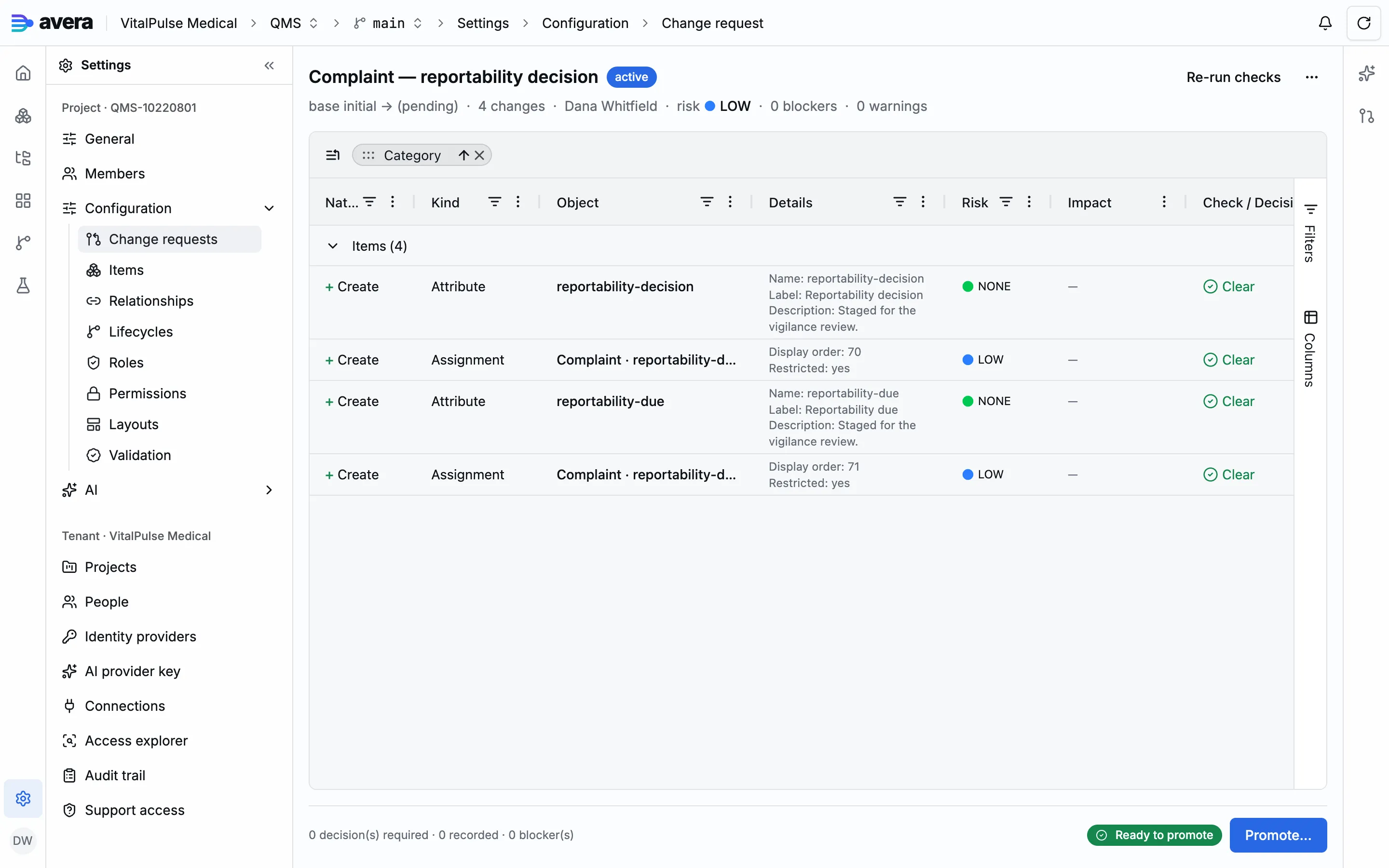
Where verification warns, or impact analysis puts overall risk at medium or above, a validation decision is required before promotion: one verdict per question, with a rationale.
| Verdict | What it records | Effect on promotion |
|---|---|---|
| Accept | the residual risk is taken as it stands | the question is answered |
| Mitigate | the risk is taken, with the compensating action named in the rationale | the question is answered |
| Reject | the change should not go live | refused while it stands |
Promotion is the one gate
Section titled “Promotion is the one gate”Promotion re-runs verification against the configuration as it stands, not the preview you read earlier: blockers reject it, and so does a missing or rejected validation decision.
On success the changes are applied, the new configuration version carries the number and name you gave it with the full configuration snapshot and its hash, an immutable verification log is recorded with the validation decisions, and the change request reads merged. You can approve the promotion with an electronic signature in the same step, binding it to that version’s configuration hash.
Every promotion also records a whole-baseline verification matrix, where the state of validation is read. See Validation and CSV/CSA.
When a change request closes
Section titled “When a change request closes”Promoting or abandoning closes a change request. Abandoning applies nothing and asks for a reason. Pending proposals targeting it become expired rather than dismissed: a dismissal is a human decision.
A worked example
Section titled “A worked example”Adding a clinical rationale to design inputs in the VitalPulse Pro project.
- Under Change requests, choose New change request and name it “Design input: clinical rationale”, describing why: the clinical reasoning belongs on the item, not in review comments.
- Open Items, go to the Attributes tab and choose New attribute. Name it
clinical-rationale, label it Clinical rationale, and give it the data type Text (Multi-line). - Open the Design Input item type, go to its Attributes tab and assign
clinical-rationale: optional, not restricted. - Back on the change request, choose Re-run checks. The grid lists two changes under Items: a Create of kind Attribute, and a Create of kind Assignment naming Design Input and the attribute. Both read Clear, nothing is blocked, no decision required.
- Choose Promote…, name the version “Clinical rationale on design inputs”, check the counts, then Promote & apply. The page confirms the configuration version created and its verification log.
- In the list this one now reads merged with its two changes, beside “Retire the legacy hazard note”, abandoned with the one change it staged: the field it proposed to remove is cited by the risk management report. Its reason is on the audit entry for the closure, not the row.